Posts

Showing posts with the label Haiku OS

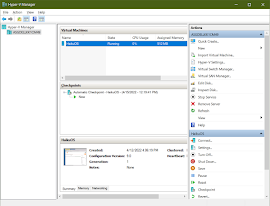
Running HaikuOS Beta 3 in Microsoft's Hyper-V in Windows 10
Image
I have configured and run Haiku in VirtualBox, but I was wanting to try running Haiku in Hyper-V. Hyper-V is a Microsoft product that is part of Windows Professional, and since a commercial license is required when running Virtual box in a commercial environment, I decided to try out Hyper-V instead as not everyone will be able to use VirtualBox if they are working in a commercial environment and don't want to pay for a VirtualBox license.  In Hyper-V I configured a standard machine, and I removed the default network adapter and installed a legacy network adapter instead. Initially I had configured the machine with a legacy network adapter because I was trying to get OS/2 Warp 4.52, eComstation 1.2, eComstation 2.0, eComstation 2.1, and eComstation 2.2 Beta 5 to work, but I wasn't able to get a machine to boot any of these OS/2 versions. More research is needed for that, so I decided to try Haiku as Haiku is a more modern Operating System. I thought Haiku would work better with...

Running Haiku OS on a Dell Optiplex 3020 Desktop Computer

Image
Well, I got it to work. I wasn't sure if Haiku would even boot on a Dell Optiplex 3020 desktop computer, but it did. I had a large monitor attached to the Dell Optiplex 3020 computer, so when Haiku booted, part of the bottom of the screen was jumbled, but after setting a higher resolution, Haiku filled the entire screen with no problems.  Haiku also detected the NIC, and I was able to access the Internet by default. The only hardware I was not able to test yet is the sound card. This is because I hadn't connected external speakers to the desktop. The Pulse demo program detected the 5 cores of the installed Intel i5 processor. The method of booting Haiku on the Dell Optiplex 3020 was a USB memory stick that had Haiku Beta 3 on it. I had burned the 32 GB Sandisk memory card with a bootable Haiku image. I wasn't sure the Optiplex would be able to boot from a USB stick, but it booted from the Sandisk with no problem. As a bonus, it booted faster than a DVD-ROM or CD-ROM, which ...

Testing Haiku OS on Dell PowerEdge R620 with two 2.5G 6-core Intel Xeon Processors

Image
I've been wanting to test Haiku OS on an Intel Xeon processor for a while. And recently I had my chance after having access to a  Dell PowerEdge R620 that was pulled from production. So I used a downloaded copy of Haiku OS nightly build from 8/20/2019. Below are screenshots of the maker and line as well as the processor specs for the system. BIOS Manufacture Screen BIOS Screen of Dell PowerEdge R620 used for testing Haiku did detect all the core processors (as shown in the screenshot below. It also found the network cards, although I was unable to test network connectivity. Haiku did not, however, detect the SAS drives as the screenshot also shows. Showing of Processor cores, NICs, drives As part of the test I ran GL Teapot, two Chart instances and the Haiku demo animation. The system ran quite fine. It was a quick test. I was hoping to install Haiku, but it didn't see the SAS drives. Still I considered it a successful test of Haiku on Intel Xeon proces...

Trying LibreOffice on HaikuOS

Image
I've been testing out the R1B1 HaikuOS lately, and I decided to test drive its version 5 of LibreOffice. I used LibreWriter to work on a 28 page document that I copied over from the MacOS version of LibreWriter. My experience with LibreWriter is that it works fairly well on Haiku, but there are two problems that I encountered. The first problem is with the Copy-Paste functionality. Initially, if I copied data from either WebPositive or StyledEditor, then it would paste into the LibreWriter document successfully. However, if I performed a copy from within the document and pasted elsewhere in the document, then it seems that LibreWriter would no longer be able to access data from the system clipboard. The only way I found for LibreWriter to access the system clipboard was to restart the App. The second problem I encountered was when I attempted to export a LibreWriter document to a PDF. I encountered an App crash when attempting to export to PDF from the File>Export As... ...

Trying Out FreeBSD 12.0

Image
It has been several years since I have experimented with FreeBSD . And lately I have been watching FreeBSD videos on YouTube as well as reading articles about it. I recon that my interest was perked recently when I read that the new package manager in the HaikuOS was designed similarly to the package manager in FreeBSD. So a few days ago, I downloaded the new FreeBSD 12.0 ISO and created a new VM to test it out. Well, I had forgotten that FreeBSD boots to a text login prompt as apposed to a graphical login prompt. As I was exploring and trying to get X working, the process was reminding me of the time several years ago (back in the 90's) when I first started learning Linux. Back then X had to be configured manually by editing config files. Configuring X became a little easier when I discovered xconfigurator . Thankfully the FreeBSD documentation helped walk me through setting up X and getting a window manager installed. I chose Xfce as a window manager since it is l...

Getting PostgreSQL running on HaikuOS

Image
The past few days I have been experimenting with the Beta 1 release of HaikuOS. This is how I got PostgreSQL 9.3 to work after installing in from the HaikuDepot App. There is a PostgreSQL 9.6 version but I was not able to get it working. The 9.6 package seems to be incomplete. So for this article, we will use PostgreSQL 9.3 instead. Install PostgreSQL Install PostgreSQL 9.3 from HaikuDepot with the following steps. 1. Open HaikuDepot from the Application menu on Tracker. 2. In the Tools menu, select Refresh repositories . 3. In HaikuDepot, ensure that the check box next to  Show only featured packages is empy and unchecked. 4. In the Search terms text box enter postgre . After a few seconds all the available PostgreSQL packages should be displayed. 5. In the list select postgresql.  To the left of the  Install  button ensure the version is 9.3.5-2. If not, select the next postgresql in the list and see if it is version 9.3.5-2. 6. Click the Ins...

Repurposing Old x86 Computers with Haiku OS

Image
There are several videos on YouTube that demonstrate Haiku, and its BeOS predecessor, running multimedia applications efficiently on old x86 desktop and laptop computers. See Haiku performance videos here and here , and see a performance video of its predecessor BeOS here . Such great performance makes Haiku a great Operating System with which to re-purpose old x86 desktop and laptop computers. See this video for a 10 minute demonstration produced by Be, Inc. for the original BeOS. It is quite impressive what could be done on a Pentium III back in 1999. So if you have any older x86 hardware laying around, then verify that it will still work and then download the new Beta version from Haiku's website and try out the OS. Once Haiku OS is installed, there are other application to download to get productive. For web browsing the OS includes a web browser called WebPositive . It is a decent web browser and should be able to work on most common websites.  For office applicati...

Advantage of Haiku OS: Unity

The Beta release of Haiku OS is now available . If you enjoy tinkering with computer software, then give it a try. There are several advantages of Haiku. In this post I'll only discuss one of the advantages.That advantage being the unity of the Haiku platform. I first used Haiku back when it was called BeOS, and I continued to use if for a few years after Be, Inc, which was the original developer, went bankrupt. I had stopped using it mainly because it lacked a decent web browser. Web surfing is a common pastime of mine, and the lack of a good web browser was annoying. But recently the web browser situation has been improving as the Haiku team has been slowly improving its web browser to the point of which is bearable for me. Although this is still an area that needs improvement and could be considered a disadvantage by some, it is much better than it has been in the past and it continues to show improvements. The biggest and, I think, the best advantage of Haiku OS is that i...

Haiku OS Reaches Beta Release

Several years ago I discovered the Be Operating System. I really enjoyed using BeOS , as it was commonly named. It was a light-weight OS that was very responsive. I had been an AmigaOS fan for several years, and at the time when I discovered BeOS, the AmigaOS was stagnant and no new hardware was being produced.  But time has progressed and software has been written for a BeOS replacement named Haiku OS . A beta version of the Operating System has been produced and is now available for download .  I will write more about Haiku in the future. For a good video overview of Haiku OS Beta 1, please see Bryan Lunduke's review on YouTube .