Posts

Commodore OS Vision 2 on Dell Latitude 5511 i7 32GB Laptop

Image
I'm experimenting with trying to run the Commodore OS Vision 2 system on different computers.  I work in IT, so I have access to various computers. Mostly Dell computers since that's the standard where I work.  For the first test, I tried the Commodore OS Vision 2 bootable ISO on a Dell Latitude 5511 BTX Intel i7 32GB RAM laptop. The OS detected the Ethernet connection and allowed me to access the Internet with no issues. I haven't figured out the Wifi yet, so that's a work in progress. I managed to use Bluetooth and connect a wireless Dell WL5022 headset (in the image above it's shown on the left side of the screen). It was successfully tested with YouTube audio and local audio testing as well. The integrated speakers worked as well. I used it as a mobile music station listening to music while I moved around working on setting up computers and such. This laptop does not have a DVD drive, so that was not tested.  Overall the OS is very responsive on the laptop. I on...

Commodore OS Vision 2 in Hyper-V

Image
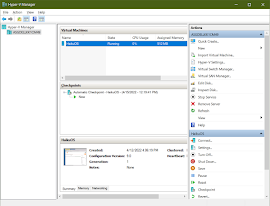
Commodore OS Vision 2 in Hyper-V Apparently, I somehow missed the release of the new version of Commodore OS Vision! Version 2 was released back in December 2023, but I apparently missed it. I've been hoping someone would take up the project again from when it ended back when CommodoreUSA closed business. Luckily for fans of the OS, it's back. Here is a screenshot of my Hyper-V settings used to successfully run the ISO and install Commodore OS Vision 2: Of note is in Security disable Secure boot and number of processors changed from default to 2. I also disabled Checkpoints as a personal preference.  Installing Commodore OS Vision 2 was pretty straight-forward. Download the ISO file from here . Create a blank HDD (mine was 25GB). Mount the ISO file in the VM, then boot the VM. It boots from the ISO, then start and run the Installer in Commodore OS Vision.  More Screenshots: Happy computing!

Trying Out HaikuOS Beta 4

Image
First test for HaikuOS Beta 4 using NetPositive to compose this blog entry.  Basic text. Not much luck with graphics in Blogger here. The Copy-Paste within WebPositive into the typing textform does not work. At all. So that's a bummer. Copy-Paste works in other areas of WebPositive but just not into the Blogger article textbox. Content can be copied from the textbox into other text areas but not even to another area of the textbox. Weird. Gotta figure out why. I did manage to insert an image! The Haiku Beta 4 download image. So that's a step in the right direction in using HaikuOS and WebPositive to create blog articles using web pages and CMS webpages. 

OpenBSD 7.1 in Hyper-V - Third Attempt

Image
So in a previous article I mentioned installing OpenBSD into Hyper-V. I had encountered a problem with disk space while trying to install packages. A partition the size of 20GB and 30GB was too small for the auto-partition feature of the OpenBSD installer. Gnome and Firefox took too much space for the auto-partition feature. In fixing the space issue, I thought about possibly redoing the OpenBSD installation and use manual partitioning in order to have more space. It worked. The auto-installer creates 9 partitions for OpenBSD. There is the root partition along with tmp, var, usr, usr/X11R6, usr/local, usr/src, usr/obj, and /home. So I deleted all these non-root partitions. I then had to delete the SWAP partition as it was preventing the root partition from being resized. I resized partition A to 95% of the 30GB disk and created a new SWAP partition that used the remaining 5% of the drive.  This arrangement probably isn't ideal for a production or a long-term setup, but it works we...

FreeBSD and OpenBSD in Hyper-V - First Attempts

Image
So I wanted to try out the  new FreeBSD 13.1. Rather than installing it onto a physical computer, I decided to try creating a virtual machine in Hyper-V.  Hyper-V is a Microsoft product, and it was all I am able to use in the work environment that I am in. In a previous experiment I was able to create a Linux Mint virtual machine in Hyper-V with no problems.  However, I did encounter problems setting up FreeBSD 13.1 in Hyper-V. I eventually gave-up on getting FreeBSD 13.1 to work in Hyper-V. I tried a few different ideas, but I was never able to get X-Windows to recognize the keyboard. The keyboard worked fine to type in startx, but once X started, the keyboard wouldn't work.  It was a little disappointing not being able to get FreeBSD working in Hyper-V, but alas, some times such things happen. To stay within the BSD family, I decided to try out OpenBSD. I had very little knowledge of OpenBSD, but I decided to get it a try in Hyper-V. Unlike FreeBSD 13.1, X Windows...

HaikuOS for Nostalgia Word Processing with Old MS-DOS Fonts

Image
So in relation to me looking for old Word Processor applications, I started thinking and trying to determine the core reason or reasons that caused me to like old word processors.  After giving it considerable thought, I started to conclude that maybe is was, oddly enough, the font used in the old word processors that actually caused me to like the old word processors. Trying to find a font that is nostalgic to me. Some times one simply cannot get away from the things of old. And the things of old seem to be comforting, for some odd reason.  So I started looking around the Internet for fonts. Since I started word processing with WordPerfect 4.3 way back in 1990 or so, I started there. WordPerfect 4.3 was a MS-DOS based application, so all of the typing was done in a MS-DOS interface with whatever font was used in MS-DOS.  Searching the Internet for the MS-DOS font eventually landed me with a font named, " Code Page 437 ."  Font names commonly associated with and simi...

Running HaikuOS Beta 3 in Microsoft's Hyper-V in Windows 10

Image
I have configured and run Haiku in VirtualBox, but I was wanting to try running Haiku in Hyper-V. Hyper-V is a Microsoft product that is part of Windows Professional, and since a commercial license is required when running Virtual box in a commercial environment, I decided to try out Hyper-V instead as not everyone will be able to use VirtualBox if they are working in a commercial environment and don't want to pay for a VirtualBox license.  In Hyper-V I configured a standard machine, and I removed the default network adapter and installed a legacy network adapter instead. Initially I had configured the machine with a legacy network adapter because I was trying to get OS/2 Warp 4.52, eComstation 1.2, eComstation 2.0, eComstation 2.1, and eComstation 2.2 Beta 5 to work, but I wasn't able to get a machine to boot any of these OS/2 versions. More research is needed for that, so I decided to try Haiku as Haiku is a more modern Operating System. I thought Haiku would work better with...

Ecomstation 2.2 Beta 5 running on a Dell Optiplex 3020 Desktop Computer

Image
Way back in the 1990s, I experienced IBM's OS/2 Warp 2.1 operating system. There wasn't a lot of software for it compared to Microsoft Windows 3.x, but OS/2 was a stable system. Had I stuck with writing instead of gaming, I may have stayed with OS/2 through the years, but alas, one cannot change history. Fast forward to 2022, and OS/2 is less popular than even Linux. Nevertheless, OS/2 is still around and being actively developed. ArcaOS is the new name for OS/2. But between OS/2 Warp and ArcaOS, there was another developer that had named OS/2 as Ecomstation. Ecomstation was an updated OS/2 Warp 4 distribution that added drivers and support for more modern computer architectures.   After my recent experiments with installing OS/2 Warp 4.52 in VirtualBox, I decided to try locating a copy of Ecomstation that I could try out. Several years ago I had downloaded a copy of a demo of Ecomstation 1.2, so I knew there was a demo image of Ecomstation somewhere out there on th...

Running Haiku OS on a Dell Optiplex 3020 Desktop Computer

Image
Well, I got it to work. I wasn't sure if Haiku would even boot on a Dell Optiplex 3020 desktop computer, but it did. I had a large monitor attached to the Dell Optiplex 3020 computer, so when Haiku booted, part of the bottom of the screen was jumbled, but after setting a higher resolution, Haiku filled the entire screen with no problems.  Haiku also detected the NIC, and I was able to access the Internet by default. The only hardware I was not able to test yet is the sound card. This is because I hadn't connected external speakers to the desktop. The Pulse demo program detected the 5 cores of the installed Intel i5 processor. The method of booting Haiku on the Dell Optiplex 3020 was a USB memory stick that had Haiku Beta 3 on it. I had burned the 32 GB Sandisk memory card with a bootable Haiku image. I wasn't sure the Optiplex would be able to boot from a USB stick, but it booted from the Sandisk with no problem. As a bonus, it booted faster than a DVD-ROM or CD-ROM, which ...

Installing Legacy Word Processors on OS/2 Warp: WordPerfect

Image
So I had this idea of installing a legacy word processor application onto an old Operating System. I decided to use OS/2 Warp 4 as the OS.  In the past I was a fan of OS/2 Warp. I liked its stability and its responsiveness. It was truly, in my opinion, better than Windows 3/95. In a previous experiment I tried working with OS/2 Warp 3, and I even bought a licensed copy off of Ebay several years ago. My copy of OS/2 Warp 3 came on 3.5" floppies and included  CD-ROMs.  I had installed OS/2 Warp 3 on an old computer, but I quickly realized that without Internet connectivity, it was hard to do much with it. Warp 3 was around at a time when the Internet was still young, so extra networking software was needed to browse the World Wide Web. After this realization, I moved on to other Operating Systems. For some reason I have lately been interested in using old Word Processing applications. I was researching WordPerfect and discovered there were two versions of it for OS/2: ...