Posts

Running HaikuOS Beta 3 in Microsoft's Hyper-V in Windows 10
Image
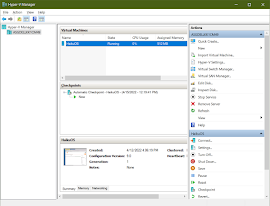
I have configured and run Haiku in VirtualBox, but I was wanting to try running Haiku in Hyper-V. Hyper-V is a Microsoft product that is part of Windows Professional, and since a commercial license is required when running Virtual box in a commercial environment, I decided to try out Hyper-V instead as not everyone will be able to use VirtualBox if they are working in a commercial environment and don't want to pay for a VirtualBox license.  In Hyper-V I configured a standard machine, and I removed the default network adapter and installed a legacy network adapter instead. Initially I had configured the machine with a legacy network adapter because I was trying to get OS/2 Warp 4.52, eComstation 1.2, eComstation 2.0, eComstation 2.1, and eComstation 2.2 Beta 5 to work, but I wasn't able to get a machine to boot any of these OS/2 versions. More research is needed for that, so I decided to try Haiku as Haiku is a more modern Operating System. I thought Haiku would work better with...

Ecomstation 2.2 Beta 5 running on a Dell Optiplex 3020 Desktop Computer

Image
Way back in the 1990s, I experienced IBM's OS/2 Warp 2.1 operating system. There wasn't a lot of software for it compared to Microsoft Windows 3.x, but OS/2 was a stable system. Had I stuck with writing instead of gaming, I may have stayed with OS/2 through the years, but alas, one cannot change history. Fast forward to 2022, and OS/2 is less popular than even Linux. Nevertheless, OS/2 is still around and being actively developed. ArcaOS is the new name for OS/2. But between OS/2 Warp and ArcaOS, there was another developer that had named OS/2 as Ecomstation. Ecomstation was an updated OS/2 Warp 4 distribution that added drivers and support for more modern computer architectures.   After my recent experiments with installing OS/2 Warp 4.52 in VirtualBox, I decided to try locating a copy of Ecomstation that I could try out. Several years ago I had downloaded a copy of a demo of Ecomstation 1.2, so I knew there was a demo image of Ecomstation somewhere out there on th...

Running Haiku OS on a Dell Optiplex 3020 Desktop Computer

Image
Well, I got it to work. I wasn't sure if Haiku would even boot on a Dell Optiplex 3020 desktop computer, but it did. I had a large monitor attached to the Dell Optiplex 3020 computer, so when Haiku booted, part of the bottom of the screen was jumbled, but after setting a higher resolution, Haiku filled the entire screen with no problems.  Haiku also detected the NIC, and I was able to access the Internet by default. The only hardware I was not able to test yet is the sound card. This is because I hadn't connected external speakers to the desktop. The Pulse demo program detected the 5 cores of the installed Intel i5 processor. The method of booting Haiku on the Dell Optiplex 3020 was a USB memory stick that had Haiku Beta 3 on it. I had burned the 32 GB Sandisk memory card with a bootable Haiku image. I wasn't sure the Optiplex would be able to boot from a USB stick, but it booted from the Sandisk with no problem. As a bonus, it booted faster than a DVD-ROM or CD-ROM, which ...

Installing Legacy Word Processors on OS/2 Warp: WordPerfect

Image
So I had this idea of installing a legacy word processor application onto an old Operating System. I decided to use OS/2 Warp 4 as the OS.  In the past I was a fan of OS/2 Warp. I liked its stability and its responsiveness. It was truly, in my opinion, better than Windows 3/95. In a previous experiment I tried working with OS/2 Warp 3, and I even bought a licensed copy off of Ebay several years ago. My copy of OS/2 Warp 3 came on 3.5" floppies and included  CD-ROMs.  I had installed OS/2 Warp 3 on an old computer, but I quickly realized that without Internet connectivity, it was hard to do much with it. Warp 3 was around at a time when the Internet was still young, so extra networking software was needed to browse the World Wide Web. After this realization, I moved on to other Operating Systems. For some reason I have lately been interested in using old Word Processing applications. I was researching WordPerfect and discovered there were two versions of it for OS/2: ...

Tried to install Aros Icaros 2.3 Hostbridge on Linux Mint 20.3 but did not succeed

Image
Sometime in the past I was able to install Icaros Hostbridge on Linux Mint 19.3. Since Linux Mint 20.3 was recently released, and I had installed it on a Dell Latitude laptop, I decided to try the newest version of Icaros 2.3 on it.  My effort was not successful. Icaros is an Aros distribution that is based upon the Amiga 3.1 operating system. I have used AmigaOS in the past, and I wanted to try Aros hosted in modern Linux environment.  I had downloaded Icaros Desktop light as it was the smallest-sized download that could be run hosted in Linux. After downloading Icaros Desktop light, I burned the iso file to a 32GB Sandisk memory stick, and then mounted it in Linux. I set the script to install Icaros on Linux to executable, then ran the install script.  The Linux install script installed additional packages for Linux Mint, and then attempt to install the Icaros files into the ~/IcarosDesktop folder. While copying the files over to the ~/IcarosDesktop folder, this is wher...

Installing Linux Mint 20.3 on Dell Latitude E5570 Laptop

Image
I decided to try installing the current version of Linux Mint (v. 20.3) onto a Dell Latitude E5570 laptop . I was curious to see how well Linux would function and perform on a somewhat recent laptop. The laptop has an Intel i7 processor and 32GB of RAM and was running Windows 10. During the Linux install, I simply had the installer wipe the SSD and use the entire drive. Goodbye, Windows! I created a bootable 32GB USB jumpdrive with the Linux Mint 20.3 installer. To create this, I used the balenaEtcher utility on Windows 10 to create the bootable jumpdrive. Once created, I inserted the 32GB USB memory stick into the laptop, rebooted the computer, then, using F12 after reboot, selected the USB device as the boot option. The laptop booted flawlessly into the Linux Mint 20.3 installer. Following the reboot after installation, Linux Mint booted with no problems to the login screen. I logged into Linux, then was greeted by the Linux Mint Cinnamon desktop as well as the login sound. So the ...

Personal Write word processor for Amiga

Image
  Shortly after writing of my experiences with Amiga word processors , I found another Amiga word processor that was not included in the previous article. I had previously experimented with Final Writer 5, WordPerfect 4.1, and AmigaWriter 2.0. The actual article was written primarily in WordPerfect 4.1 for Amiga, exported to WP format for MSDOS, loaded into LibreOffice on Linux Mint, then copied and pasted into web forms for my blog and on the forums at Amigaworld.net. The other word processor that I found for Amiga was Personal Write. I had encountered it somewhere on the Internet during my previous experiments. In my search, and after running the program, I discovered that it was last updated by Cloanto back in 1995. I was trying to find a copy of Personal Write when I eventually discovered that it was available on AmigaForever. Since I have a legal copy of AmigaForever, I eventually found Personal Write on my emulated Amiga under Work:Software/AmiToRTF as PWrite. ...

Recent AmigaOS 3.1 Word Processor Experiments

Image
  Recently I have been experimenting with word processing programs under AmigaOS 3. Years ago, back in the 90's, I used my A1200 with Final Writer to create term papers for college. Before I bought my A1200; however, I was using a Gateway 2000 computer running Windows 3.1 on an Intel 386DX/33 processor. For my old Gateway computer, I had landed on a word processor called Breeze. It was a simple, DOS based word processor that was free (shareware), which is the right price for a college student, and did everything that I need. None of my term papers needed graphics or clip art, so a basic word processor was all that I required. I still used Breeze on MSDOS even after I bought my A1200. A year or so after purchasing my A1200, I finally decided on buying Final Writer 5. It did word processing along with graphics, and it worked with my, at that time, high quality Epson dot-matrix printer. Final Writer did quite well for me. Along with my A1200, I was able to cr...

Testing Haiku OS on Dell PowerEdge R620 with two 2.5G 6-core Intel Xeon Processors

Image
I've been wanting to test Haiku OS on an Intel Xeon processor for a while. And recently I had my chance after having access to a  Dell PowerEdge R620 that was pulled from production. So I used a downloaded copy of Haiku OS nightly build from 8/20/2019. Below are screenshots of the maker and line as well as the processor specs for the system. BIOS Manufacture Screen BIOS Screen of Dell PowerEdge R620 used for testing Haiku did detect all the core processors (as shown in the screenshot below. It also found the network cards, although I was unable to test network connectivity. Haiku did not, however, detect the SAS drives as the screenshot also shows. Showing of Processor cores, NICs, drives As part of the test I ran GL Teapot, two Chart instances and the Haiku demo animation. The system ran quite fine. It was a quick test. I was hoping to install Haiku, but it didn't see the SAS drives. Still I considered it a successful test of Haiku on Intel Xeon proces...

AmigaOS 3.x and Icaros 2.2.5 GLUT and MUI program experiments

Image
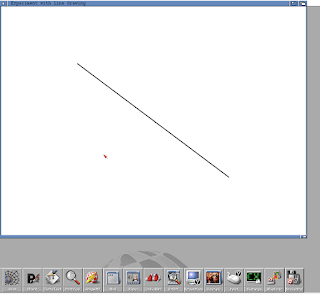
I recently tested two types of programs on Icaros 2.2.5/Aros. The first was a basic GLUT program while the other was a basic MUI program. GLUT AmigaOS 3.x running simple GLUT program. I tried GLUT as I was looking for a cross platform GUI library that provides basic windowing functions in OpenGL. Although GLUT provides basic window functions, it lacks in gadgets. So I did a further search and found the Agar Library  and the GLUI Library , both of which I will try in the future. So in testing GLUT on Icaros 2.2.5 and on AmigaOS 3.x, I downloaded a small sample program from this website . The sample program is here . I did modify the program and changed the screen resolution to 800 x 600 rather than the default of 1280 x 800. The sample GLUT program ran and operated successfully on AmigaOS 3.x, which was running on WinUAE 3.4.0. When running on Icaros the program ran but it did not draw the line. So unsure as to the cause of this on Icaros as other OpenGL programs ha...